
Linux Raid - mdadm
內容表格
- 1. 說明
- 2. 新增 Raid
- 3. 使用 Raid
- 4. 維護 Raid
- 5. 監控 Raid 狀態
- 6. 移除 Raid
- 7. 客製系統通知程序
- 8. 選用:檢測硬碟健康狀態
- 9. 延伸閱讀
說明
mdadm - Linux Software Raid
主要套件:mdadm
主要服務:mdmonitor (監控 Raid 狀態)
系統管理注意要項:
- 因 Linux 開機 MBR 無法作 Raid,除了初次系統安裝時,第一顆磁碟會有記錄以外,還要另外手動複寫至第二顆磁碟,同時,以後如有對第一、二顆磁碟做更換後,也需每次手動複寫開機記錄。
- /boot 磁區可以使用 raid 1
- 注意:一旦機器有磁碟故障後,切勿在沒有磁碟插入的狀況下進行系統重啟,否則在系統重啟後,既有的所有磁碟代號都會重新排序過,以至於造成管理上的困擾與磁碟設定上的錯亂。如果不小心重啟機器,不要做任何磁碟變動,只要將機器關機,然後在空 bay 上將磁碟重新插回,重新啟動機器,所有的磁碟代號應該回復之前的正常狀態。
使用心得:
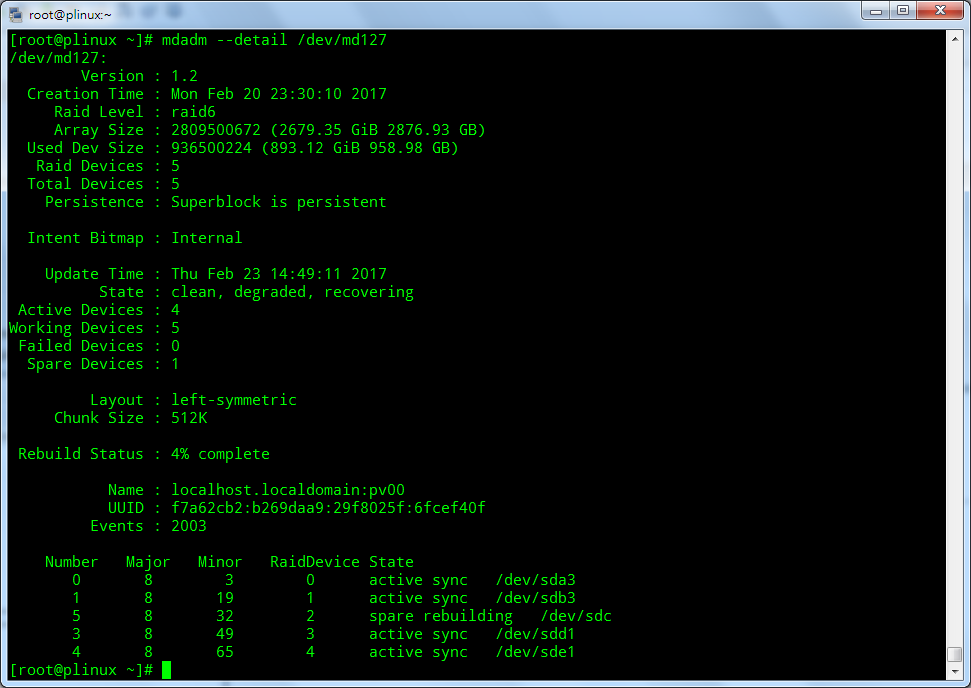
- 用 5 顆 SSD 磁碟 900 GB 做 Raid 6,有做 LVM,Linux 主系統安裝在這個 Raid 上。一旦有一顆磁碟故障,做完更換後 Raid 開始進行 Rebuild 時,會有以下現象:
- 在 command line 模式執行任何指令,發生頻繁的延遲反應,直到 Rebuild 完成後才正常。
- Rebuild 時間約需 4 小時以上。
新增 Raid
Raid 0
# mdadm --create --verbose /dev/md0 --level=0 --raid-devices=2 /dev/sdb /dev/sdc
Raid 1
# mdadm --create --verbose /dev/md0 --level=1 --raid-devices=2 /dev/sdb /dev/sdc --spare-devices=/dev/sdd
Raid 5
# mdadm --create --verbose /dev/md0 --level=5 --raid-devices=3 /dev/sdb /dev/sdc /dev/sdd --spare-devices=/dev/sde
使用 Raid
# mkfs.ext4 /dev/md0
# mkdir /data01
# mount /dev/md0 /data01
維護 Raid
Raid 設定檔 /etc/mdadm.conf
重新掃描 raid 與更新設定檔
mdadm --verbose --detail -scan > /etc/mdadm.conf
設定警告郵件通知
/etc/mdadm.conf,加上這行 (NOTE: 只能設定一個信箱)
MAILADDR user@my.company.com
顯示 Raid 整體狀態
cat /proc/mdstat
顯示 /dev/md0 詳細資訊
# mdadm --detail /dev/md0
/dev/md0:
        Version : 1.2
  Creation Time : Mon Nov  3 06:03:03 2014
     Raid Level : linear
     Array Size : 4194288 (4.00 GiB 4.29 GB)
   Raid Devices : 2
  Total Devices : 2
    Persistence : Superblock is persistent

    Update Time : Mon Nov  3 06:03:03 2014
          State : clean
 Active Devices : 2
Working Devices : 2
 Failed Devices : 0
  Spare Devices : 0

       Rounding : 0K

           Name : localhost.localdomain:0  (local to host localhost.localdomain)
           UUID : a50ac9f2:62646d92:725255bd:7f9d30e3
         Events : 0

    Number   Major   Minor   RaidDevice State
       0       8       16        0      active sync   /dev/sdb
       1       8       32        1      active sync   /dev/sdc
更換磁碟
- 確認要更換的磁碟名稱與所屬的 raid,假設是 /dev/sdc, raid127
- 執行 mdadm 從 raid127 移除磁碟 /dev/sdc
- 取出舊磁碟,並更換新磁碟
- 執行 fdisk 檢查新磁碟 /dev/sdc 是否存在
- 執行 mdadm 加入磁碟 /dev/sdc 至 raid127
// 將磁碟標示為 Fail
mdadm /dev/raid127 --fail /dev/sdc

// 移除磁碟
mdadm /dev/raid127 --remove /dev/sdc

// 加入磁碟
mdadm /dev/raid127 --add /dev/sdc
監控 Raid 狀態
/proc/mdstat
# awk '/^md/ {printf "%s: ", $1}; /blocks/ {print $NF}' </proc/mdstat
md126: [UU]
md127: [UUUUU]

# watch -t 'cat /proc/mdstat'
iotop 檢視狀態
# iotop -a -p $(sed 's, , -p ,g' <<<`pgrep "_raid|_resync|jbd2"`)
iostat 檢視狀態
# iostat -dmy 1 /dev/md127
# iostat -dmy 1 /dev/md126
mdmonitor 警告郵件測試
# mdadm --monitor --scan --oneshot --test
警告通知的郵件內容
This is an automatically generated mail message from mdadm
running on plinux.localdomain
A Fail event had been detected on md device /dev/md/pv00.
It could be related to component device /dev/sdc1.
Faithfully yours, etc.
P.S. The /proc/mdstat file currently contains the following:
Personalities : [raid1] [raid6] [raid5] [raid4]
md126 : active raid1 sda2[0] sdb2[1]
1049536 blocks super 1.0 [2/2] [UU]
bitmap: 0/1 pages [0KB], 65536KB chunk
md127 : active raid6 sda3[0] sdb3[1] sdc1[2](F) sde1[4] sdd1[3]
2809500672 blocks super 1.2 level 6, 512k chunk, algorithm 2 [5/4] [UU_UU]
bitmap: 0/1 pages [0KB], 65536KB chunk
unused devices: <none>
移除 Raid
停止並永久移除
# mdadm --stop /dev/md0
# mdadm --remove /dev/md0
啟動 raid
# mdadm --asemble /dev/md0
NOTE : The assemble command reads the /etc/mdadm.conf file to start the array. In case you did not save your configuration in mdadm.conf before stopping the array, this command would fail. You can use the below command to recreate the mdadm.conf file :
# mdadm –examine –scan > /etc/mdadm.conf
客製系統通知程序
優點:
- 可以多個郵件收到通知信
- 通知信的內容可以客製
編輯 /etc/mdadm.conf,加上
PROGRAM /path/to/raid-event.sh
/path/to/raid-event.sh
#!/bin/bash
#
# mdadm RAID health check
#
# Events are being passed to xmessage via $1 (events) and $2 (device)
#
# Setting variables to readable values
event=$1
device=$2
# Check event and then popup a window with appropriate message based on event
if [ $event == "Fail" ];then
    message="A failure has been detected on device $device"
    else
    if [ $event == "FailSpare" ]; then
        message="A failure has been detected on spare device $device"
        else
        if [ $event == "DegradedArray" ]; then
            message="A Degraded Array has been detected on device $device"
            else
            if [ $event == "TestMessage" ]; then
                message="A Test Message has been generated on device $device"
            fi
        fi
    fi
fi

output="/tmp/my.log"
echo "event=$event" > $output
echo "device=$device" >> $output
echo $message >> $output
echo "EOF" >> $output
選用:檢測硬碟健康狀態
請參閱:smartctl - Test If Linux Server SCSI / SATA / SSD Hard Disk Going Bad
- 標籤 (Edit tags)
- 什麼連接到這裡
文件 1

| 文件 | 大小 | 日期 | 附件上傳者 | |||
|---|---|---|---|---|---|---|
 | mdadm-rebuild.png Raid Rebuilding | 58.1 KB | 14:58, 23 Feb 2017 | alang | 動作 | |
| Images 1 | ||
|---|---|---|
 Raid Rebuildingmdadm-rebuild.png | ||