
Mindtouch (Dekiwiki)
內容表格
- 1. 說明
- 2. 安裝 Mono 2.10.8
- 3. 安裝 MySQL 與其他套件
- 4. 安裝 Mindtouch 10.1.4
- 5. Mindtouch 設定
- 6. 安裝新的 Mindtouch
- 7. 回復舊網站資料
- 8. 啟動 Mindtouch
- 9. F.A.Q
- 10. 延伸閱讀
更多文章:
說明
Mindtouch (前身為 Dekiwiki),自 2013 年下半年起,官方對 OpenSource 版已停止繼續維護,最後版為 Mindtouch 10.1.4。
系統環境:
- CentOS 5.8 32/64-bit, CentOS 6 64-bit
- Apache 2.2.3
- Mono 2.10.8
- Mindtouch 10.1.4
原始檔下載連結:
安裝 Mono 2.10.8
Installing Dependencies
http://fedoraproject.org/wiki/EPEL
// for CentOS 5
wget http://mirror01.idc.hinet.net/EPEL/5/i386/epel-release-5-4.noarch.rpm
rpm -Uvh epel-release-5-4.noarch.rpm

// for CentOS 6
yum install https://dl.fedoraproject.org/pub/epel/epel-release-latest-6.noarch.rpm
yum install bison gettext glib2 freetype fontconfig libpng libpng-devel libX11 libX11-devel glib2-devel libgdi* libexif glibc-devel urw-fonts java unzip gcc gcc-c++ automake autoconf libtool make bzip2 wget
Downloading and Compiling
http://origin-download.mono-project.com/sources/mono/
NOTE: 不要安裝新版 mono,會無法啟動授權檔。
cd /usr/src
wget http://download.mono-project.com/sources/mono/mono-2.10.8.tar.gz
tar xzf mono-2.10.8.tar.gz
cd mono-2.10.8
./configure --prefix=/opt/mono-2.10.8
make && make install
TIP:
如果安裝過程遇到錯誤 Out of memory 時,就執行
ulimit -v unlimited
Completed the installation
# /opt/mono-2.10.8/bin/mono --version
Mono JIT compiler version 2.10.8 (tarball Sun Jul  6 02:48:03 EDT 2014)
Copyright (C) 2002-2011 Novell, Inc, Xamarin, Inc and Contributors. www.mono-project.com
        TLS:           __thread
        SIGSEGV:       altstack
        Notifications: epoll
        Architecture:  x86
        Disabled:      none
        Misc:          softdebug
        LLVM:          supported, not enabled.
        GC:            Included Boehm (with typed GC and Parallel Mark)
安裝 MySQL 與其他套件
for CentOS 6
yum install mysql-server httpd php-common php php-mysql php-gd \
php-mbstring php-mcrypt wv links tidy html2ps mod_ssl \
poppler-utils html2text mod_proxy_html
Install Prince
wget http://www.princexml.com/download/prince-11.3-1.centos6.x86_64.rpm
rpm -ivh prince-11.3-1.centos6.x86_64.rpm
安裝 Mindtouch 10.1.4
for Cent OS 6)
wget http://repo.mindtouch.com/CentOS_5/noarch/mindtouch-10.1.4-6.1.noarch.rpm
rpm -ivh mindtouch-10.1.4-6.1.noarch.rpm
for CentOS 5)
cd /etc/yum.repos.d
wget http://repo.mindtouch.com/CentOS_5/home:mindtouch.repo -O mindtouch.repo
或者,手動新增 /etc/yum.repo.d/mindtouch.repo
[home_mindtouch]
name=mindtouch's Home Project (CentOS_5)
type=rpm-md
baseurl=http://repo.mindtouch.com/CentOS_5/
gpgcheck=1
gpgkey=http://repo.mindtouch.com/CentOS_5/repodata/repomd.xml.key
enabled=1
開始安裝
yum install mindtouch
Mindtouch 設定
設定 Apache
新增 /etc/httpd/conf.d/deki-apache.conf
<VirtualHost *:80>
        ServerName www.example.com
        #ServerAlias

        ErrorLog /var/log/httpd/error-dekiwiki.log
        CustomLog /var/log/httpd/access-dekiwiki.log common

        DocumentRoot "/var/www/dekiwiki"

        RewriteEngine On
        RewriteCond %{REQUEST_URI} ^/$
        RewriteRule ^/$ /index.php?title= [L,QSA,NE]

        RewriteCond %{REQUEST_URI} !^/(@api|editor|skins|config|deki)/
        RewriteCond %{REQUEST_URI} !^/index\.php
        RewriteCond %{REQUEST_URI} !^/favicon\.ico$
        RewriteCond %{REQUEST_URI} !^/robots\.txt$
        RewriteCond %{REQUEST_URI} !^/error/(.*)\.var$
        RewriteCond %{QUERY_STRING} ^$ [OR] %{REQUEST_URI} ^/Special:Search
        RewriteRule ^/(.*)$ /index.php?title=$1 [L,QSA,NE]

        # Bug: 5252 https rewrite/proxy rules
        RewriteCond %{HTTPS} =on
        RewriteCond %{REQUEST_URI} ^/@api/
        RewriteCond %{QUERY_STRING} !^(.*)dream.in.scheme= [NC]
        RewriteRule ^/@api/(.*)$ http://localhost:8081/$1?dream.in.scheme=https [QSA,P,L]

        RewriteCond %{HTTPS} =on
        RewriteCond %{REQUEST_URI} ^/@api/
        RewriteCond %{QUERY_STRING} ^(.*)dream.in.scheme= [NC]
        RewriteRule ^/@api/(.*)$ http://localhost:8081/$1 [QSA,P,L]
        # End Bug: 5252

        # deki-api uses encoded slashes in query parameters so AllowEncodedSlashes must be On
        AllowEncodedSlashes On

        # FIXME:
        # Some php flags we need. These are only needed until all
        # the short php open tags are changed to long in the source code.
        php_flag short_open_tag on
        # Allow short open tags and turn off E_NOTICE messages
        php_value error_reporting "E_ALL & ~E_NOTICE"
        # Setting php memory parameters
        # php_value memory_limit "128M"
        # php_value post_max_size "64M"
        # php_value upload_max_filesize "64M"

        # mod_proxy rules
        ProxyPass /@api http://localhost:8081 retry=1
        ProxyPassReverse /@api http://localhost:8081
        SetEnv force-proxy-request-1.0 1
        SetEnv proxy-nokeepalive 1

        <Proxy *>
          AddDefaultCharset off
          Order deny,allow
          Deny from all
          Allow from all
        </Proxy>
</VirtualHost>

<Directory "/var/www/dekiwiki">
        # Possible values for the Options directive are "None", "All",
        # or any combination of:
        #   Indexes Includes FollowSymLinks SymLinksifOwnerMatch ExecCGI MultiViews
        #
        # Note that "MultiViews" must be named *explicitly* --- "Options All"
        # doesn't give it to you.
        #
        # The Options directive is both complicated and important.  Please see
        # http://httpd.apache.org/docs-2.2/mod/core.html#options
        # for more information.
        Options None
        # AllowOverride controls what directives may be placed in .htaccess files.
        # It can be "All", "None", or any combination of the keywords:
        #   Options FileInfo AuthConfig Limit
        AllowOverride All
        # Controls who can get stuff from this server.
        Order allow,deny
        Allow from all
</Directory>
啟動服務
service httpd start
chkconfig httpd on
設定 MySQL
service mysqld start
chkconfig mysqld on
mysql_secure_installation
安裝新的 Mindtouch
http://server-ip-address/ , 透過網頁指引完成初始化安裝
TIPs:
- 確定 httpd 服務已啟動
- 需先設定 MySQL 管理密碼
- 確認 mono 安裝目錄 /opt/mono-2.10.8/bin/mono
- 出現訊息: Mono was not found in your path. Please specify the path to mono in the Advanced Configuration section. , 可以忽略它。
Web Installation:
- Choose Install Type : Mindtouch Core
- Site Info
- Site Name: 網站名稱(NOTE:如果最後要回復就網站資料,這裡隨便填)
- Admin email: admin@localhost.localdomain
- Site Location: Taiwan
- Admin Info
- First Name: admin *重要*
- Last Name: 可不填
- Phone: 可不填
- Admin password: *重要*
- Confirm password: *重要*
- Database Configuration
- Database Host: localhost
- Database name: wikidb
- Database user: wikiuser
- Existing MySQL Credentials
- Superuser name: root
- Superuser password: *重要*
- Advanced Configuration
- Mono: /opt/mono-2.10.8/bin/mono
- 其餘項目不用變動
- Tell us a little about you
- Number of people in your organization: 可不填
- Department: 可不填
- How do you plan on using Mindtouch: 可不填
- INSTALL MINDTOUCH: 按下後開始進行安裝,請耐心等候。
安裝程序完成時,頁面會顯示
Your Install Is Almost Complete!
Your MindTouch license could not be generated. Please follow the steps below to retrieve your license....
參考附檔:Installation Completed
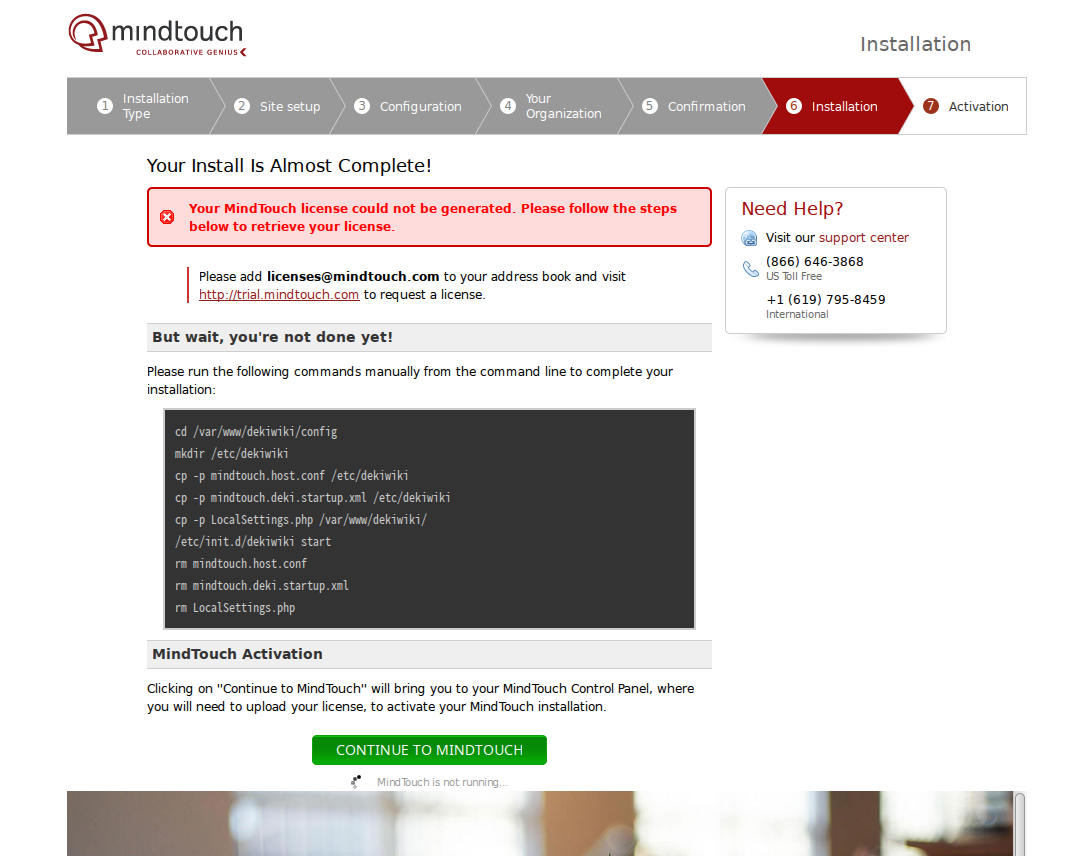
繼續完成下述指令
cd /var/www/dekiwiki/config
cp mindtouch.host.conf /etc/dekiwiki
cp mindtouch.deki.startup.xml /etc/dekiwiki
cp LocalSettings.php /var/www/dekiwiki/
chmod 0644 /etc/dekiwiki/mindtouch*
chmod 0644 /var/www/dekiwiki/LocalSettings.php
rm mindtouch.host.conf
rm mindtouch.deki.startup.xml
rm LocalSettings.php
/etc/init.d/dekiwiki stop
/etc/init.d/dekiwiki start
安裝完成。
開啟網站首頁,並以剛剛設定的管理員帳號登入。
TIPs:
第一次登入管理控制台,顯示網站尚未啟動授權,以致無法正常運作。上傳授權檔 license.xml 並啟動網站。
啟動服務時,如無法立即出現網頁,需等待數分鐘。
啟動授權作業時,需等待數分鐘直到網頁顯示
License Type: Mindtouch Core Perpetual licemse
參考附檔:License Activated

到此,一個新的 Mindtouch 網站已經完成。
回復舊網站資料
NOTE:確認以下檔案已經存在
- DB 備份檔: /data/wikidb.sql
- 網頁附件備份目錄: /data/dekiwiki/attachments/
- 小圖示: /data/dekiwiki/favicon.ico
// 還原資料庫
mysql -u root -p wikidb < /data/wikidb.sql

// 還原網頁檔的附件目錄 attachments
cp -rp /data/dekiwiki/attachments/* /var/www/dekiwiki/attachments/
chown -R dekiwiki:apache /var/www/dekiwiki/attachments/
NOTE: 資料庫一旦還原完成,網站的管理者密碼與所有網站的參數設定都會變成舊網站的設定。
舊網站的客製化設定檔(選用)
/var/www/dekiwiki/LocalSettings.php:
...
//
$wgProfileApi = true;
$wgDefaultTimezone  = '+08:00'; //GMT offset
//
$wgDefaultEditorEngine = 'FCKeditor';
$wgDefaultEditor = 'FCKeditor';
//
$wgForceCP = true;
網站小圖示:
cp /data/dekiwiki/favicon.ico /var/www/dekiwiki/
啟動 Mindtouch
chkconfig mysqld on
chkconfig httpd on
chkconfig dekiwiki on

service httpd start
service dekiwiki start
F.A.Q
舊網站資料庫還原後,重新開啟網頁出現錯誤:
HTTP Response Status Code: 500
An exception was thrown: Could not find specified column in results in MySql.Data
ANS:原因可能是舊網站是比較舊的 Mindtouch 或 Dekiwiki 版本,解決方式如下:
# cd /var/www/dekiwiki/maintenance/
# php update-db.php

 Updating wikidb on localhost
Applying misc database updates...done
added 'languages' config key
Start update script
added 'files/blacklisted-disposition-mimetypes' config key
fixing recentchanges.rc_cur_id data
dropping stored procedures
adding user_seat column to users table
dropping table `linkscc`
dropping table `objectcache`
dropping table `querycache`
Done.
- 標籤 (Edit tags)
- 什麼連接到這裡
文件 1
| 文件 | 大小 | 日期 | 附件上傳者 | |||
|---|---|---|---|---|---|---|
 | license.xml Activate Mindtouch | 22.24 KB | 17:04, 21 Feb 2017 | alang | 動作 | |
| Images 0 | ||
|---|---|---|
| No images to display in the gallery. |