
- You do not have permissions to view this page - please try logging in.
- You do not have permissions to view this page - please try logging in.
- You do not have permissions to view this page - please try logging in.
- You do not have permissions to view this page - please try logging in.
內容表格
沒有標頭Diagram of OSSBox video out ports
The are five formats of video output in OSSBox:
DVI
AV-Out
S-Video Out
Component (Pr/Pb/Y) Out
D-SUB(VGA) Out (needs adapter)
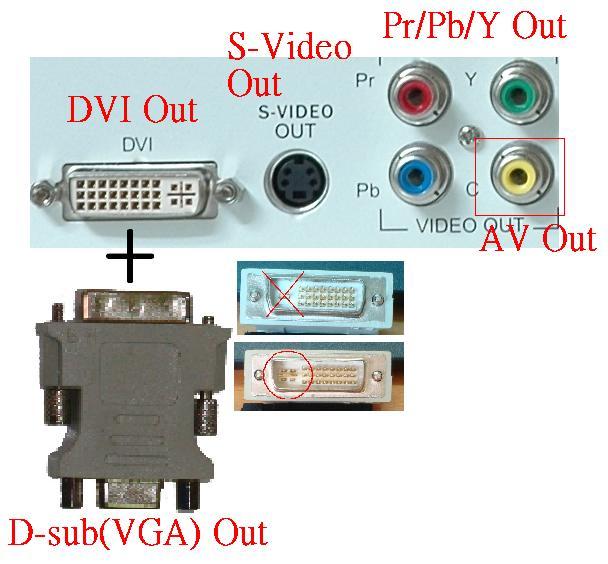.jpg)
BIOS Settings
Different output formats require its own settings in BIOS
Advanced Chipset Features Press DEL to enter into BIOS and select Advanced Chipset Features

Select Display Device

Make selections depending on different output needs:
DVI Select DVI to fit DVI format
CRT Select VGA to fit CRT format
TV Select TV to fit Component-Video, AV, S-Video formats

If the screen color is incorrect when using component-vedio out, re-enter into BIOS to select TV_Connector in Advanced Chipset Features

Please select the input format that your monitor accepts.

Save settings before exit.
- Was this page helpful?
- 標籤 (Edit tags)
- 什麼連接到這裡

| Images 0 | ||
|---|---|---|
| No images to display in the gallery. |