
OSSLab::開放軟體實驗室(Open Source Software Lab) > VoIP > IP PBX > 軟體式 IP PBX > Asterisk - 免費 IP PBX 網路電話交換平台 > Addons > Web-MeetMe
- You do not have permissions to view this page - please try logging in.
- You do not have permissions to view this page - please try logging in.
- You do not have permissions to view this page - please try logging in.
內容表格
- 1. 開始安裝
- 1.1. 設定 ODBC
- 1.2. 設定MySQL資料庫
- 1.3. 設定 Web-MeeetMe
Web-MeetMe 是一套基於 Asterisk 平台的電話會議管理套件。
官方下載:http://sourceforge.net/projects/web-meetme/
軟體特色
- Conference number conflict avoidance
- Recurring conferences
- Daily, weekly or bi-weekly
- Enforces a user password if a admin password is set
- Seperate views for past, current and future conferences
- Editing future conferences
- Includes a series of conferences
- Deleting past conferences
- CDR-like view of past conferences
- Includes a link to conference recordings
- One click features to
- Extend an active conference (time)
- Kick out all participants
- Out-call to include participants
- Optional early join features
- fuzzystart allows a caller to enter a room early (in seconds, set in cbmysql.conf)
- earlyalert notifies a call that their conference has not yet started, if they enter a valid conference number and the conference is scheduled to start soon.(in seconds, set in cbmysql.conf)
管理介面
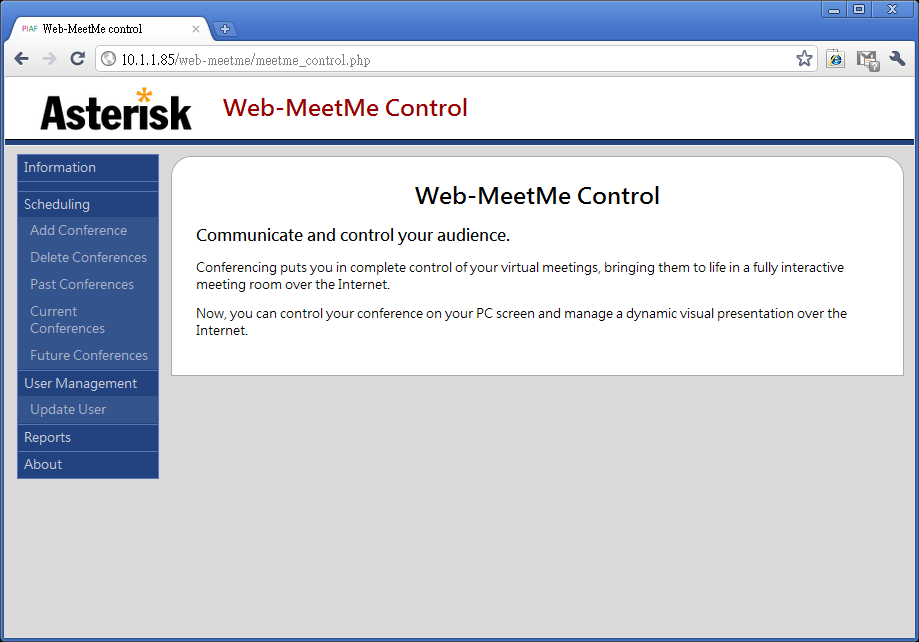
開始安裝
設定 ODBC
編輯 /etc/odbc.ini
[MySQL-Asterisk]
Description     = ODBC for MySQL
Driver          = MySQL
Server          = 127.0.0.1
Database        = meetme
Port            = 3306
Socket          = /tmp/mysql.sock
Option          =
Stmt            =
Trace           = yes
TraceFile       = /tmp/odbc.log
編輯 /etc/asterisk/res_odbc.conf
[meetme]
dsn => MySQL-Asterisk
username => <db-username>
password => <db-password>
pre-connect => yes
編輯 /etc/asterisk/extconfig.conf
meetme => odbc,meetme,booking
編輯 /etc/asterisk/cdr_adaptive_odbc.conf
[wmm]
connection=meetme    ;Note that this matches res_odbc.conf
table=cdr
編輯 /etc/asterisk/cdr.conf
endbeforehexten=no
設定MySQL資料庫
建立資料庫 meetme
#mysql -uroot -p
mysql> create database meetme;
匯入資料庫 schema
#cd /var/www/html/web-meetme/
#cd cbmysql/
#mysql -uroot -p meetme < ./db-table-create-v7.txt
匯入管理員帳號
#mysql -uroot -p meetme < ./db-admin-user-create.txt
Tips:
* 預設管理帳號: admin@localhost, 密碼:wmmpw
* 如果使用 LDAP 認證,可忽略此步驟。
設定 Web-MeeetMe
編輯 /web-meetme/lib/database.php
$database = 'meetme';
$host = 'localhost';
$username = 'db_user';
$password = 'db_pass';
編輯 /etc/asterisk/manager_custom.conf
[MeetMe]
secret = ami_pass
read = call
write = command,originate
編輯 /web-meetme/phpagi/phpagi.example.conf
[asmanager]
# server to connect to
server=localhost

# default manager port
port=5038

#username for login
username=MeetMe

#password for login
secret=ami_pass
預設的網頁登入是 LDAP 模式,改成資料庫認證。
編輯 /web-meetme/lib/defines.php
// Comment out the following lines to disable authentication
define ("AUTH_TYPE", "sqldb"); // adLDAP or sqldb
- Was this page helpful?
- 標籤 (Edit tags)
- 什麼連接到這裡
文件 1

| 文件 | 大小 | 日期 | 附件上傳者 | |||
|---|---|---|---|---|---|---|
| web-meetme.png Web-MeetMe Home | 42.63 KB | 16:28, 10 May 2011 | alang | 動作 | |
| Images 1 | ||
|---|---|---|
 Web-MeetMe Homeweb-meetme.png | ||
您必須 登入 才能發佈評論。
Powered by MindTouch Core